Velluto
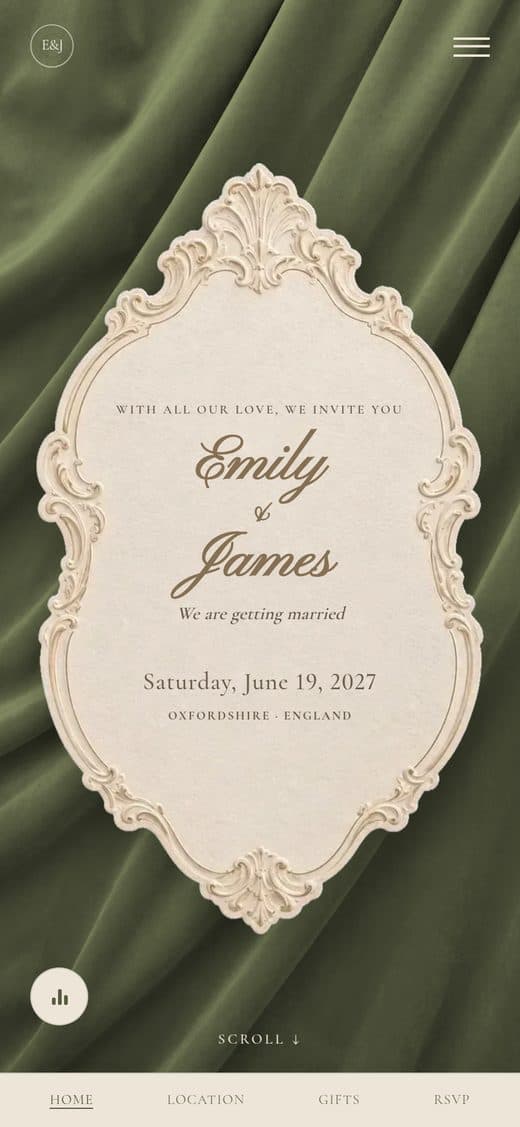
On the cover, an embossed ivory baroque cartouche with gold rules and lettering rests on draped velvet: inside are your names in script, the date and the place. If you upload a photo of your own, it takes the place of the velvet and the cartouche stays on top. Right after, an ivory card brings together the countdown, with the numbers in small embossed medallions, and your story, with the photo in a scalloped frame that follows it, portrait or landscape. As you scroll, the sections alternate: arched ivory cards with garlands of engraved tulips and lilies above and below, and full sections in your colour with pen-drawn flowers beside the title, different in every section. In the Location, a little temple above the ceremony, a villa above the reception and the date in a light rococo frame. The colour starts as olive green and you can change it whenever you like: velvet, sections, garlands, flowers and texts all change together, while the cartouche stays ivory and gold.
- Ivory and gold baroque cartouche on velvet, even over a photo of your own
- Countdown in embossed medallions, inside the card of your story
- Arched ivory cards with garlands of engraved tulips and lilies
- Pen-drawn flowers, different in every section
- Olive green to start with, or any colour you choose
- In your languages, with RSVP in just a few taps
- Customizable colours and fonts
Amber Glow
Frequently asked questions
- Can we change the colour?
- Yes. The colour starts as olive green; from the palette you can choose Navy, Bordeaux, Sepia or Forest Green, or a colour of your own. Velvet, full sections, garlands, flowers and texts all change together; the cover cartouche stays ivory and gold.
- Can we put a photo of our own on the cover?
- Yes. Your photo takes the place of the velvet and the cartouche with your names stays on top, like an invitation card resting on the photo. You can add a photo at the bottom of the invitation too.
- Can we change the decorations?
- Yes. Garlands, flowers, medallions, the photo frame and the Location drawings can each be replaced with an image of your own or hidden, section by section, from Configure invite.